How to Set Up Paperclip AI and Run a Business With an Agent Team
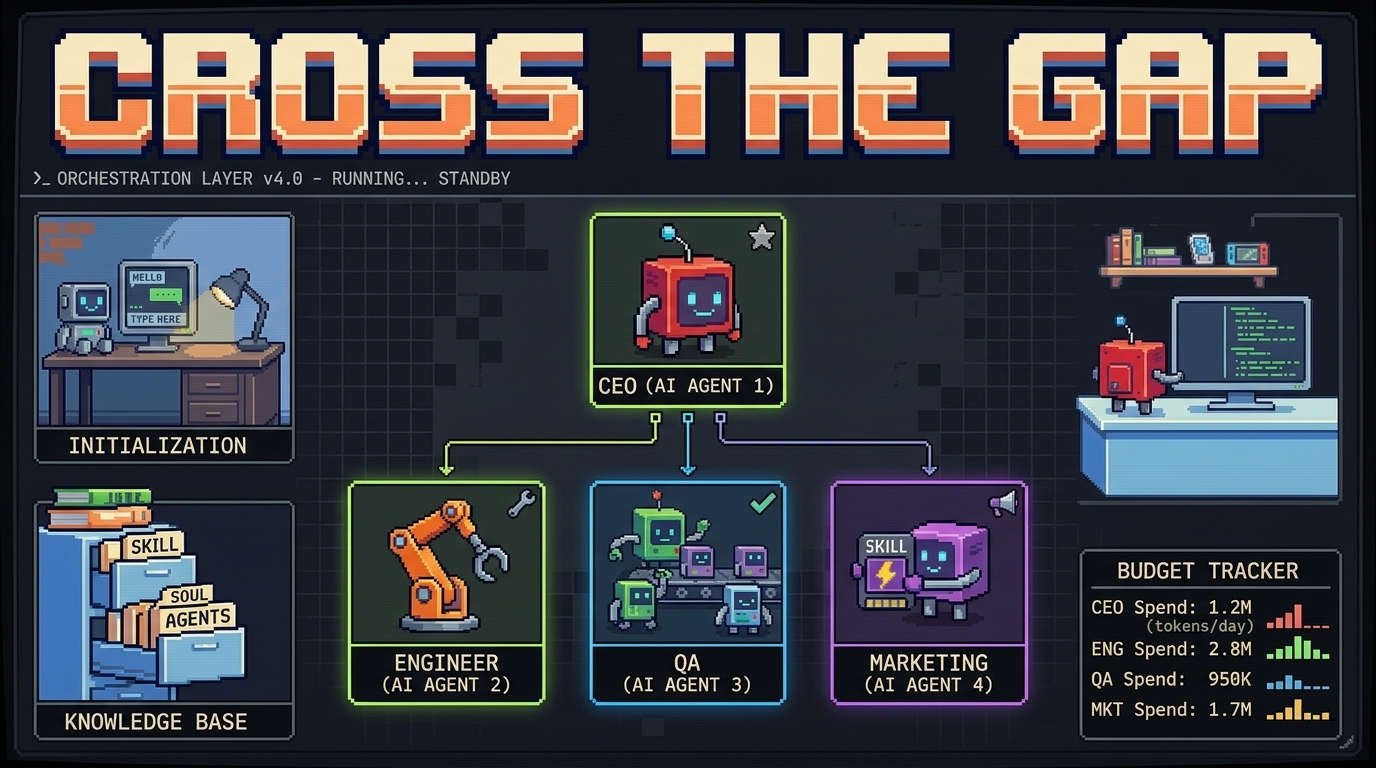
Most people are still using AI like a fancy search engine — asking one question, getting one answer, and moving on. But a new wave of founders and developers has figured out something different: you can build an entire team of AI agents, give them jobs, set them loose on real work, and check in like a CEO instead of a babysitter.
Paperclip is the tool making that possible. In less than three weeks after launch, it crossed 35,000 stars on GitHub. That doesn’t happen by accident. It happens when something solves a real problem that a lot of people didn’t have a clean name for yet.
This guide breaks down what Paperclip actually is, how to get it running, and how founders and developers are using it to build businesses that run with minimal human intervention — including how we use it at Polygonerz to manage AI agent workflows for our clients.
What Is Paperclip AI — And Why Is Everyone Talking About It?
Paperclip is an open-source AI agent orchestration platform. That’s the technical description. The plain-English version: it’s a company operating system for AI agents.
Here’s the mental model the Paperclip team uses, and it’s a good one: if OpenClaw is an employee, Paperclip is the company. A single AI agent — whether it’s running on OpenClaw, Claude Code, or any other runtime — can do one job at a time. Paperclip coordinates multiple agents, assigns them roles, tracks their work, controls their budgets, and gives them shared context about what the company is trying to accomplish.
Before Paperclip, running multiple AI agents looked like this: ten open terminal tabs, no way to track what any of them were doing, no budget controls, and a total loss of context every time the machine rebooted. Paperclip replaces that chaos with a dashboard, a ticket system, and an audit log.
What Paperclip Is — And What It Isn’t
It helps to be clear about the boundaries before you set it up.
Paperclip IS: an orchestration layer that coordinates AI agents. A company operating system with org charts, goals, budgets, and audit trails. Compatible with Claude Code, OpenClaw, Codex, Cursor, and any HTTP-based agent. Fully open source, self-hosted, no Paperclip account required.
Paperclip IS NOT: a drag-and-drop workflow builder. A replacement for your AI provider or model. A code review tool. A single-agent tool — if you have one agent, you probably don’t need it. If you have twenty, you definitely do.
That last point matters. Paperclip is designed for complexity. If you’re running a solo task with one AI session, a terminal and Claude Code is probably enough. Once you need multiple agents working on the same project — a writer, a coder, a QA reviewer, a data analyst — Paperclip is where you go.
Who Is Actually Using Paperclip?
The early adopter profile is interesting. It’s not just developers.
Indie founders are using it to run marketing, content, and customer research simultaneously across agent teams. Small agencies are using it to manage client projects with AI doing the execution. Developers building their own products are using it to parallelize the work: one agent planning, one coding, one testing.
At Polygonerz, we work with nonprofits and founders who need the leverage of a full team without the headcount. Paperclip fits directly into that model. It’s the coordination layer that makes an agent swarm feel like a structured organization instead of a pile of scripts.
System Requirements Before You Install
Paperclip is lightweight. Before you start, confirm you have:
- Node.js 20 or higher — check with node –version. Install via nvm if needed: nvm install 20.
- pnpm 9.15 or higher — install with npm install -g pnpm.
- Git — most systems have this; run git –version to confirm.
- An LLM provider — Claude Code, OpenClaw, Codex, or an OpenRouter API key.
No external database setup required. Paperclip spins up an embedded PostgreSQL instance automatically on first run.
How to Install Paperclip: Step by Step
Step 1 — Run the Onboarding Command
Open your terminal and run:
npx paperclipai onboard –yes
The –yes flag accepts all defaults for a fast start. Without it, you’ll be prompted to customize database, server, and storage settings — useful once you’re ready to configure for production, but skip it your first time.
When the setup completes, you’ll see:
✓ Paperclip server running at http://localhost:3100
✓ API available at http://localhost:3100/api
✓ UI available at http://localhost:3100
Step 2 — Open the Dashboard
Navigate to http://localhost:3100 in your browser. On first load, Paperclip shows an Onboarding Wizard — not an empty dashboard. It walks you through four steps: create a company, configure your first agent, set a company goal, and assign a task.
Step 3 — Create Your First Company
A company in Paperclip is a fully isolated workspace. Every company has its own agents, tasks, budgets, and audit trail. Agents in one company have zero visibility into another — useful if you’re running multiple projects or client accounts from one installation.
Give your company a clear mission statement. This isn’t decorative — every task your agents execute traces back to the company goal. The more specific it is, the better your agents perform.
Good example: “Build and ship a SaaS landing page for [Product Name] — including copy, design spec, and deployment.”
Vague example: “Do marketing stuff.”
Step 4 — Hire Your First Agent
Each agent in Paperclip has an adapter that defines which AI tool it uses and how it communicates. The most common adapters at launch are Claude Code, OpenClaw, Codex, and any OpenRouter-compatible model.
A few practical rules when configuring your agent team:
Don’t run Opus on every agent. Model allocation by role matters. Use your most capable model for the CEO agent that plans and delegates. Use faster, cheaper models for execution agents doing repetitive tasks.
Write clear persona prompts. Your agents wake up capable but with zero memory of what they were doing. The heartbeat checklist and persona prompt are what orient them. Invest time here.
Install skills before you assign work. Skills are reusable capability modules that extend what an agent can do without retraining. The community at agentskills.io maintains a growing library.
Step 5 — Set Budget Limits and Approve the First Plan
Budget enforcement in Paperclip is strict. Every agent has a budget. Every tool call has a price. You see where money goes before it’s gone.
When your CEO agent receives the company goal, it will propose an initial strategy. Click Approve in the dashboard — this is the gate that unlocks the CEO to begin delegating work. Until you approve, nothing moves. Governance is baked in from the start.
Step 6 — Monitor From the Dashboard
The dashboard shows you: active agents and their current task status. Cost per agent, per task, per project. Full audit log — every tool call, API request, and decision, in order. Task thread history — every instruction and response recorded.
This is the key difference between Paperclip and running a pile of terminal tabs. Nothing happens in the dark.
The Heartbeat System — How Agents Stay on Task
One of Paperclip’s most important concepts is the heartbeat. Agents don’t run continuously — they check in on a schedule, receive their current task context, execute, and report back. This is what makes Paperclip suitable for autonomous operation.
The heartbeat gives each agent: who it is (its persona). What the current plan is (read from a shared context file). Which assignments to check (pulled from the ticket system). How to store memory (file-based, using a structured Para system).
When agents make mistakes, you don’t debug the model — you add rules directly to their persona prompts. This is how you encode your own taste, standards, and preferences into the system over time.
Multi-Agent Design Patterns That Actually Work
Running one agent under Paperclip is fine. Running three with proper role separation is where it gets interesting.
A common setup that works well for product development:
- CEO Agent — reads backlog, breaks features into tasks, delegates. Recommended model: Claude Opus or GPT-4.
- Engineer Agent — writes and ships code. Recommended model: Claude Sonnet or Codex.
- QA Agent — pulls completed work, runs test cases, reports issues. Recommended model: Claude Haiku or any fast model.
The key principle: clean separation of concerns. The CEO never writes code. The QA agent runs independently. When outputs are predictable and failures are easy to diagnose, you can trust the system to run unsupervised.
An engineer-to-QA review loop — where every code output is reviewed before it moves forward — is one of the highest-leverage patterns in Paperclip. It prevents compounding errors that would otherwise require expensive human intervention to untangle.
Running Multiple Businesses From One Paperclip Install
One of Paperclip’s more underappreciated features is multi-company isolation. A single deployment can run an unlimited number of companies with complete data separation.
For agencies and solo founders managing multiple projects or clients, this is significant. One Paperclip server. Multiple isolated AI companies. One control plane.
This is part of why we integrate Paperclip into client setups at Polygonerz — it gives our clients a single command center for their AI operations regardless of how many projects are running simultaneously.
Paperclip + OpenClaw: Better Together
A question that comes up often: Paperclip or OpenClaw?
The answer is both. They’re not alternatives — they operate at different layers.
OpenClaw is an agent: it runs on your machine, takes instructions, and executes tasks. Paperclip is the organizational layer that coordinates multiple OpenClaw instances (plus other agents) into a structured company with defined roles and shared goals.
If you’re already running OpenClaw and finding yourself with three or four sessions open on the same project, that’s the signal that Paperclip is the next step. It turns what feels like managed chaos into something that can actually run overnight without you.
Already using OpenClaw and want help setting up Paperclip alongside it? The Bloomwell OpenClaw Executive Assistant setup includes full agent orchestration consulting. Book a discovery call: https://polygonerz.com/technology/openclaw-bloomwell-executive/book-a-discovery-call/
Common Setup Errors and How to Fix Them
Error: EADDRINUSE: address already in use :::3100
Another process is using port 3100. Kill it with lsof -i :3100 on Mac/Linux, then rerun. Or change the port in ~/.paperclip/instances/default/config.json under server.port.
SyntaxError: Unexpected token
You’re on an older version of Node. Run node –version — you need 20+. Fix with nvm install 20 && nvm use 20.
Failed to start embedded postgres
Check logs at ~/.paperclip/instances/default/logs/. This is usually a permissions issue or a conflicting Postgres instance.
CEO keeps rewriting the same task without the engineer picking it up
Check that the triggers_on: task_ready condition for the engineer correctly detects task file updates. Add a timestamp and status field to the task spec so Paperclip can detect freshness.
Is Paperclip Production-Ready?
Honest answer: it’s getting there. Paperclip is a newer project — 35,000+ GitHub stars in three weeks, but the ecosystem, community documentation, and production hardening aren’t at the level of older frameworks like AutoGen or CrewAI yet.
For most founders and developers reading this, that’s fine. The value you get from Paperclip’s organizational model, budget controls, and audit trails far outweighs the maturity gap for typical project and workflow automation use cases.
If you’re building on top of it for a client — or want someone who’s already navigated the setup to handle the configuration — that’s exactly what we do.
The Bigger Picture: What Paperclip Represents
The emergence of tools like Paperclip points at something important. Fifteen years ago, high-frequency trading was a luxury available only to large institutions with proprietary infrastructure. Today, anyone can access sophisticated automated trading systems.
AI agent orchestration is on the same curve. Running a structured company of AI agents — with org charts, budgets, governance, and audit trails — was science fiction two years ago. Today it’s a 15-minute setup with an open-source tool.
The founders who understand this early are building a structural advantage. Not just in productivity, but in the kind of company they can build. One person with a well-configured agent team can execute like a team of ten. That’s not a pitch. That’s what’s already happening.
What’s Next: Building Your Agent Team
Once Paperclip is running, the next decisions matter:
Define your company mission tightly — vague goals produce vague work.
Allocate models by role — don’t burn budget running Opus on your QA agent.
Install skills before you start — visit agentskills.io for community-contributed capability modules.
Set budget limits from day one — it’s much harder to add governance after agents are running.
Review the audit log regularly — this is where you catch bad patterns before they compound.
Work With Polygonerz to Set This Up
Setting up Paperclip alongside OpenClaw, Hermes, or Claude Code requires getting a few things right — especially model allocation, persona configuration, and multi-company isolation. We’ve done this for founders and nonprofits who needed the leverage of a full AI team without the complexity of managing the infrastructure themselves.
If you want a professional setup that runs the way it’s supposed to — on day one — book a discovery call: https://polygonerz.com/technology/openclaw-bloomwell-executive/book-a-discovery-call/
Or if you’re a developer who wants to wire your own WordPress site into an agent workflow, start with the WP Bloomwell AI Agent Bridge: https://polygonerz.com/technology/wordpress-ai-agent-bridge/
Skip the debugging spiral.
Get in touch →